Online merchants should never forget that their core business is selling products. But it can be an effective marketing tactic to offer other services to potential customers.
Examples of offering more than just products abound. They include things like how-to articles, blogs, entertaining videos, or communities built around topics relevant to the products being sold.
To enable these additional services or features, online merchants often must “bolt-on” extensions or software to their existing shopping carts. If there is a web developer on staff this might be no big deal, but for small businesses it can be an obstacle.
One easy-to-add feature is a new embeddable HTML5 photo editor from Aviary. This editor will allow site visitors to upload an image and make basic changes to that image before saving it. The solution might make it possible to allow for custom customer profiles, personalized product messages, or fun product sharing options.
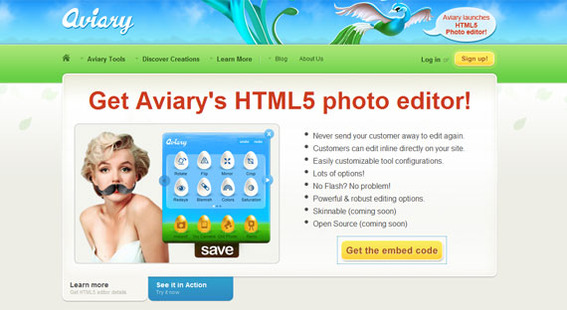
Aviary is now offering a free, embeddable HTML5 Photo Editor.
For giving merchants and all site owners a way to add new content, I am awarding Aviary’s HTML5 Photo Editor three and a half out of a possible five stars in this “The PEC Review.”
“The PEC Review” is my weekly column and video created to introduce you to the products or services that I believe might help you improve your ecommerce business. This week, let me give you a quick introduction to Aviary’s HTML5 Photo Editor and suggest a couple of possible uses.
What Is an Embeddable Photo Editor?
Simply put, Aviary HTML5 Photo Editor allows you to paste some code into your website or onto your ecommerce platform’s template pages and, thereby, add a simple photo editing tool to your own site.
Site visitors would be able to upload an image, modify that image with a simple set of tools, and save the image without leaving your site and without you having to do any web development.
The tool is even free to use.
How HTML5 Photo Editor Works
To set up the Aviary HTML5 Photo Editor, you only need to submit a bit of basic information about your site and yourself, select the available options, and get your code. Effectively, you’re creating a web widget that you will be adding dynamically to your website.
Don’t be concerned about the length of the code. All that you have to worry about is simply pasting it in.
The tool does make use of HTML5, which is the leading-edge web standard. As such, older or poorer web browsers may not be able to render it.
What Would an Online Merchant Do With It?
From the ecommerce perspective, the tool could be used as a standalone feature for customers to use. It could be included as a profile picture editor for user accounts, comments, or communities. It might be used to add either product images or customer photos to product reviews. Or it could even be used to generate custom gift messages that could be printed on packing slips when orders are shipped. For example, how neat would it be if the grandkids could include a holiday picture right on the packing slip when they send a gift to grandma?
Summing Up
 Often including additional features on your site can help engage potential customers or keep the customers that you already have. Aviary’s embeddable HTML5 Photo Editor is simple to use widget that can provide some excellent content to your site.
In its simplest form it is as easy to use as pasting code into an HTML document. More advanced uses would take some basic development skills. In either case, this free widget is certainly worth the three and a half out of a possible five stars I have awarded it in this “The PEC Review.”




 ChatGPT vs. Gemini for SEO Tasks
 5 Content Marketing Ideas for May 2024
 SEO Takeaways from SGE's Partial Rollout
 BNPL Competition Drives Wins for Merchants
 Google Ad Updates Reflect New SERPs
 How to Track ROI from Content Marketing
 The Profitable Seller: Mastering Amazon FBA