Marketing automation tools make creating landing pages a snap. They focus on making it more efficient to deliver relevant content to relevant individuals at relevant times via email and paid search campaigns. So why not use them to create landing pages for search engine optimization campaigns, too?
Because they could harm your SEO efforts. Unless they’re set up to create searchable landing pages, your marketing automation platform may be unable to drive organic search traffic and sales.
Email marketing platforms were the genesis of today’s more sophisticated marketing automation platforms. Today, these platforms can track the behavior of customers interested in your products to understand intent and deliver more targeted messaging. The goal is to move potential customers farther through that marketing funnel to eventually convert them to paying customers.
Email campaigns and paid search ads are common drivers to the customized messages contained on these targeted landing pages. Because they’re so targeted, marketers feel confident in placing specific promotions on them such as a discount or a special download. Naturally, marketers don’t want these types of targeted promotions to get indexed for anyone to find in Google and the other engines. The result would be skewed metrics and campaigns with potentially high-value promotions being distributed far too widely as more customers find the content via organic search.
That natural desire to keep targeted email and paid search landing pages out of organic search results can be the foundation of the problem with using marketing automation platforms for SEO. Unless they’re set up to make specific landing pages searchable and others hidden from search engine spiders depending on campaign needs, creating optimized landing pages for organic search with your marketing automation platform could get you nowhere.
How to Tell if Landing Pages Are Indexable
It’s reasonable to want to use this landing page generator to easily create pages that benefit SEO. For some businesses it may be the only easy way to create landing pages without going through IT. Three simple tests will identify if search engines are able to index your landing pages.
First, choose a landing page URL, preferably one you actually want to rank in organic search results. Maybe it’s the announcement of an upcoming webinar or a short article on the steps your business is taking to reduce its carbon footprint. Check to see if Google has indexed the URL by typing a site: query into the search box. For example, if the URL were pages.domain.com/webinar/event5/, the query would look like this:
Example of a site: query. Enlarge This Image
If the search results come back negative, the page is not indexed, which means it can’t rank in organic search results. The next steps test whether the page can be indexed. If the site: query returns the URL, then the page is indexed and you can skip the remaining test steps and proceed to the last part of this article starting with “More Links and Sound SEO.”
Second, view the source of that page. In most browsers you can either type Control+U or go to the “File” or “Edit” menu to view the source. Once you’ve opened the source code, look for a metatag giving a noindex command. The meta robots noindex tag directs search engine crawlers not to index that particular URL. If a search engine can’t index a URL, it can’t use its algorithms to determine that page’s relevance and authority, thereby rendering it not findable in the search results.
Example of a meta robots noindex tag. Enlarge This Image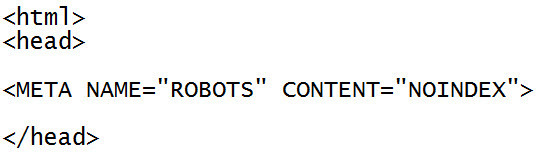
Also check the source code for a meta refresh tag, which redirects customers to another page. Some platforms will use this meta refresh tag to send customers without JavaScript enabled to a page that warns them they have JavaScript disabled. Unfortunately, since search engine crawlers don’t typically execute JavaScript, the page they see is the warning page, not the landing page itself.
Example of a meta refresh tag. Enlarge This Image
If these meta tags are present in the source code, they’re likely included at the platform level and will consequently appear on every page. Check a few more landing page URLs the same way to be sure.
Third, view the robots.txt file for the subdomain the URL sits at. For example, if the URL for the landing page were pages.domain.com/webinar/event5/, the robots.txt file you’d need to view would be at pages.domain.com/robots.txt. The robots.txt file is a simple text file that tells crawlers which areas of the site they can and cannot access. If the robots.txt file contains a Disallow command for the directory your landing page lives in, the search engine crawlers will not be able to crawl, index, or rank the landing pages in that directory.
Example of a robots.txt disallow. Enlarge This Image
How to Fix Indexation Problems
If meta tags or the robots.txt file are the issue, the first step is to check the settings on your marketing automation platform. When you create a page, is there any option to make that landing page indexable or searchable? If there is, then by all means use it and retest the landing page URLs as discussed above. The meta tag or robots.txt disallow should be removed.
If searchability is not a feature built into the landing page creation tool, the next step is to call the platform vendor and ask about using its solution for SEO landing pages. If your account representative doesn’t understand meta tags and robots.txt files, ask to talk to someone who can speak to the technical side of the issue while still using marketing friendly language.
The IT folks will need to be involved as well to implement a change to the landing page creation tool. If you have a good relationship with the developers, it may be faster to go straight to them and ask for their help solving the problem with the tool. Sometimes, frankly, it’s easier to install a blog platform on the site for content you’d like to remain searchable, rather than trying to force a marketing automation platform do SEO tasks for which it’s not built.
More Links and Sound SEO
If the indexation tests show that the URL is indeed indexed, then another SEO phenomenon is responsible for the landing pages’ poor performance. Oftentimes a landing page will be created as an orphan, a page that has no links to it. When the page is used solely for email or paid search campaigns, the lack of links is no issue. Those campaigns push customers to the lading pages directly without relying on links from the site itself.
SEO, however, relies on links as well as keyword signals to infuse a page with authority and relevance. Consequently a landing page needs to be linked from somewhere on the site to have a chance of ranking. If it’s an important page that you really want to drive a lot of organic searchers to, make sure that the page is integrated into the main navigation of the site. Just hanging a link off the sitemap won’t flow nearly enough link popularity to the landing page to help it rank for any remotely competitive keywords.
This brings me to a final but critically important point about SEO landing pages. Creating a landing page isn’t a silver bullet to drive organic search traffic, just like slapping together an email won’t drive a killer email marketing campaign. The page needs to be created with customer value in mind. It needs to be content that customers want and for which they search. Keyword research is a great way to identify these content areas. The landing page needs to be designed, written and optimized for SEO. And it needs to be promoted via the other marketing channels like email, social, and paid as appropriate to encourage visits and open the door for the first natural external links.





 ChatGPT vs. Gemini for SEO Tasks
 5 Content Marketing Ideas for May 2024
 SEO Takeaways from SGE's Partial Rollout
 BNPL Competition Drives Wins for Merchants
 Google Ad Updates Reflect New SERPs
 How to Track ROI from Content Marketing
 The Profitable Seller: Mastering Amazon FBA