


Editor’s note: As of September 2023, Google deprecated HowTo Schema.org markup and reduced the visibility of FAQ rich results to “well-known, authoritative government and health websites.”
Schema is a type of structured data that helps search engines understand the meaning of a web page. It’s contextually descriptive code. For example, say a web page contains a visible, physical address. Google could see the information and assume it is a physical address. But with the appropriate Schema markup, Google would know.
When it is confident about items in the code, Google may decide to weigh them more heavily. But Google has not been transparent about the importance of all the markup variations in Schema.org’s library.
However, Schema markup does contribute to rich snippets. And for that alone, anyone looking for more prominence in Google search results should pay attention to that form of structured data.
Rich Snippets
Today’s SEO is not just about ranking well or being in a top position. It is largely about getting searchers’ attention in a sea of other relevant results.
We see rich snippets on nearly every Google search result page. An example is rich snippets that provide searchers with instant answers using information from third-party websites. This changed the SEO game when it first appeared a few years ago. We see them many times when a searcher types a question in Google. Or when he speaks a question, and Google Assistant reads a result.
Thus optimizing for organic search should focus on all results, not just the top positions. And a good rich snippet could attract more attention than the number one spot.
FAQ Schema
There is one rich snippet that has become increasingly popular. Notice the organic search result in the screenshot below. The retailer’s listing has not only the traditional title and description but also questions. These drop-downs are the result of FAQ Schema in the code.
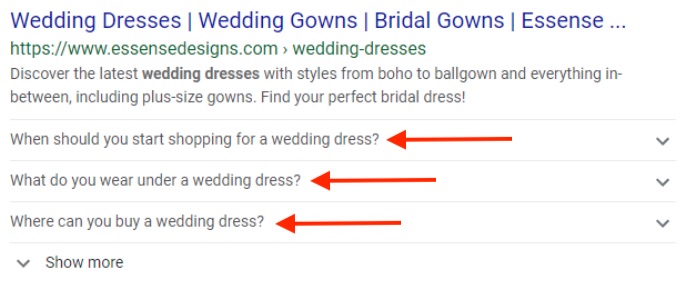
This retailer’s listing has the traditional title and description. Below it are questions, the result of FAQ Schema in the code.
Talk about owning more search result real estate! If the title tag and description don’t grab the user, maybe the Q&A will.
How do you get these snippets? First, you must have actual Q&A content on your site. In the example above, the drop-downs mirror the content in this retailer’s shopping page, which contained a “Common Questions” section.
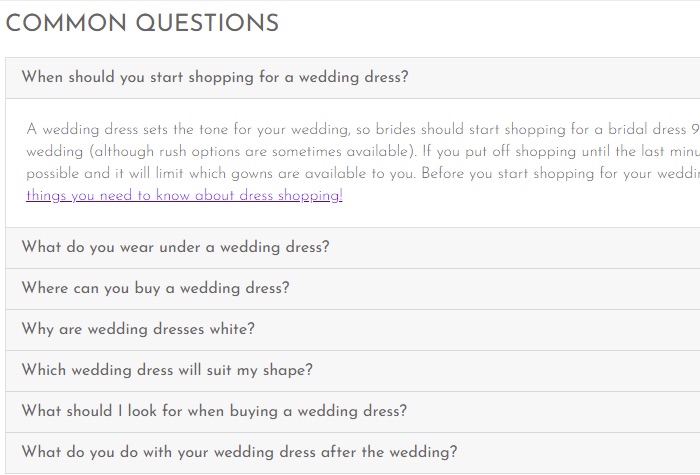
FAQ drop-downs mirror the content in this retailer’s shopping page, which contained a “Common Questions” section, as shown here.
Next, you must insert the FAQ Schema. Google provides a reference. There are a few ways to implement into dynamic ecommerce pages. The easiest is with JSON-LD, which is simple code that links data. It is straightforward to develop and place on a page. This FAQ JSON-LD Schema generator is an excellent resource, although I haven’t met a web developer who is unfamiliar.
JSON code must exactly reflect your FAQ content. This can help Google avoid deceptive cloaking techniques.
What to Expect
Adding Schema code is not a directive to Google. It may not publish your FAQ rich snippets even with structured data. In my experience, however, if the content is useful and non-spammy, the odds are high that Google will publish, provided that your FAQ markup is the best among competing websites. However, some keywords may not trigger the results, while others will. It’s all based on Google’s algorithm.
If you can implement the markup, track its impact in your analytics. I’ve seen time and again that the inclusion of FAQ rich snippets drives more traffic. And it makes sense. It’s not surprising that you will attract more clicks when you increase real estate in search results via thoughtful questions.
The process of implementing FAQ Schema is relatively easy, especially on a flexible content management system. Test the markup on a few pages. If you see more traffic, consider scaling to more.




 Google's AI Cart Will Remake Ecommerce
 AI Shifts Product Discovery, not Loyalty
 New Ecommerce Tools: May 20, 2026
 For Brands, AI Is the New Shelf Space
 How Content Marketers Misuse GenAI
 FAQs for Google's 'Preferred Sources'


 SEO for AI, Low Traffic, No Clicks