According to published reports, there were 20 million iPhones, 18 million Android-based Samsung Galaxy S3s, and 17 million iPads sold in the third quarter of 2012. The mobile channel, as such, can’t be ignored. But, “mobile” is complicated. It covers a wide range of devices and experiences. In this article, I will briefly address the key questions you should be asking about your mobile-web audience.
For starters, smartphones and tablets are two very different classes of mobile devices. Customers are likely visiting your site for different reasons and with different expectations when they use a smartphone versus a tablet. And don’t assume that your “standard” web experience is sufficient and effective for tablet users just because tablets have larger screens.
Where should you focus your investments in the mobile channel? A good place to start that analysis is with data — quantitative data you already have, and qualitative data you can get — to answer five questions.
Question 1: What Is Current Mobile Traffic?
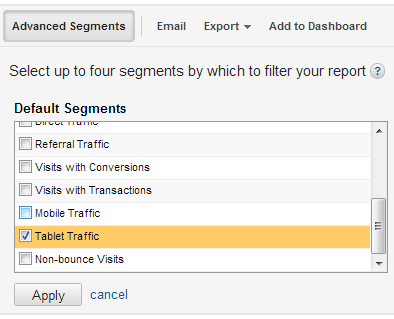
How much of the traffic to my site is from smartphone and tablet users? To determine how critical mobile is for you right now, you need to know how much smartphone-based and tablet-based traffic your site is already receiving. Google Analytics makes it pretty easy to do this through advanced segments. To get tablet traffic, simply click on Advanced Segments at the top of the Google Analytics window and choose Tablet Traffic.
Click on Advanced Segments at the top of the Google Analytics window and choose Tablet Traffic. Enlarge This Image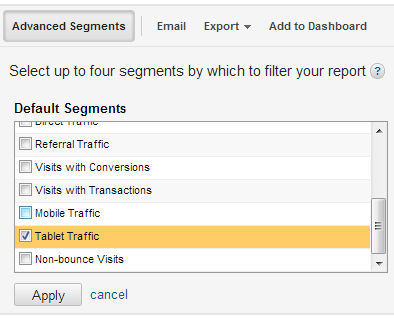
With that segment selected, navigate to Audience > Mobile > Devices to see a breakdown of the specific tablets visiting your site. Don’t be surprised if the traffic skews heavily to the iPad, but take note of the other tablets as well — if your site doesn’t effectively support Android or Windows Mobile visitors, you may be losing revenue.
Obtaining smartphone traffic data is a bit trickier, as it requires building a custom segment. I’ve built one that you can use for your site at this link. When you click on the link, you will be prompted with a window to choose the profile in which you want the segment to be available.
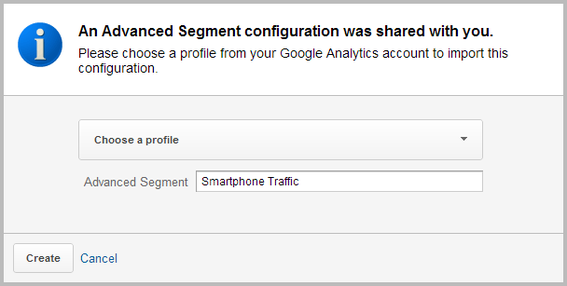
Select a profile, click Create, and then, on the next screen save the segment.
Again, view the Audience > Mobile > Devices report for a breakdown of the smartphones visiting your site.
Using these two segments, you can monitor what portion of the overall traffic to your site is from smartphones and from tablets.
Question 2: What Are Mobile Traffic Sources?
How are smartphone and tablet users getting to your site? Before answering this question with data, try to answer it based on your own speculation. Do you send out regular emails that include links that users might be reading and clicking through on their phones? Have you done outbound promotions that are specifically targeted to smartphone and tablet users?
With the two segments described above selected, go to the Traffic Sources > Sources > All Traffic report. Is this traffic you intentionally drove to the site? If so, did you drive it to pages where they would have a good mobile experience? Or, is this traffic coming through mobile-oriented social media channels such as Twitter? Are a significant number of visitors coming to the site directly, and not from a referral site or a campaign? If so, why would they be doing that? Google Analytics can’t answer this question, but you might be able to effectively speculate.
Question 3: What Are Your Goals for Mobile Users?
What would you like smartphone and tablet users to do when they come to your site? The easy answer to this question is, “Buy!” But, stop and think about why visitors would be using a smartphone or tablet rather than from a desktop or laptop. Presumably, their computer is readily available. Why is that, and what might they be doing when that is the case? Based on what you sell on your site, is it reasonable for visitors to fully complete a purchase, or would you also want them to be able to send a reminder to finish shopping when they are near their computer. Do you have a brick-and-mortar store from which they could buy the product? Would you like to use their mobile phone numbers to text offers and other communication?
In short, the question is not as straightforward to answer as it might first appear.
Question 4: What Is Behavior of Current Mobile Traffic?
Are smartphone and tablet users doing what you want them to do? Based on your answer to the previous question, and using the segments you set up in the first question, you can quickly determine if smartphone and tablet users are actually completing the tasks that you would like them to on your site. In some cases, you might realize from your answer to Question 3 that you need to update your site’s functionality, and then make sure you are measuring whether those features are being adopted.
If you have new, mobile-specific goals for your site, you may want to create those goals in Google Analytics that you can monitor based on the mobile segments you have created. And, once you’re measuring them, you can look for ways to drive better results.
Question 5: What Do Mobile Users Want?
What would smartphone and tablet users like to do when they come to your site? This is a question that you cannot answer. You can get the answer, but it has to come from your users. There are two ways to answer this question, and the types of information they give you will vary:
- Add a survey to your site that is only presented to visitors using smartphones and tablets. Be careful, however, as respondents will be responding with their phone or tablet, so keep the number of questions and the degree of long-form typing required to a minimum. And, because different mobile devices have different abilities to handle “pop-ups,” be sure that your survey does not break the site experience. Also, keep in mind that this data set is limited to visitors who have already come to your site. Depending on your answer to other questions — especially question no. 4 — you may, in the future, promote the site for additional mobile uses, and surveying your existing traffic is only going to give you limited insight as to the demand for that.
- Survey your existing customers. You can invite customers to complete a survey that includes questions about their interest in various potential mobile experiences. Presenting your current customers with a range of ways they might use your site from a smartphone or tablet — be sure to split these out — and asking them how likely they would be to use it, you can get a prioritized list to then map against your response to Question 3 to develop a roadmap for mobile users.
Summary
The question you don’t have to ask is, “Should I be thinking about mobile?” The answer is almost definitely “yes.” Without a mobile-optimized site, you are almost certainly missing opportunities to serve your customers and prospects.





 AI Shopping Could Mean Fewer Returns
 New Ecommerce Tools: September 30, 2026
 Don’t Make Them Count
 Retail Media's Opportunity Cost
 New Ecommerce Tools: October 7, 2026
 New GSC Image Filter Aids Product Discovery