


Search Console now includes filters to show only branded queries or exclude them.
Google uses AI to classify queries, and notes that it can make mistakes. Branded queries include:
- Name of company or site,
- Domain,
- Brand-specific products and services, including common misspellings.
The feature makes query filtering easier but adds no new functionality. Query filters had included brand names via regular expressions and AI prompts.
In my testing, the new filter produced brand-name variations, such as:
- One word and two,
- Hyphenated,
- Abbreviated,
- Misspellings.
The filter correctly included the names of products and of human representatives, though it skipped quite a few branded items that it evidently didn’t recognize. For example, it identified a founder’s name as a branded query but not the title of the founder’s book.
It also included queries for unrelated executives and products, as well as for competitor names and clients’ case studies. Those inclusions may have been intentional, however, depending on Google’s definition of a “brand” search.
Brand-name filters
Despite the apparent mistakes, the feature makes it easier to analyze branded and non-branded rankings.
Here are a few use cases.
Find where you’re losing customers
Competitors likely bid on your brand terms in Google Ads or create “Alternative to [Your Brand]” pages.
If your average position for a branded term isn’t number 1, or if the click-through rate is lower than 50%, a competitor might be outranking you for your own name or aggressively advertising against it.
Evaluate each instance and create a plan to improve your branded search rankings.
Track the impact of a new marketing campaign
Any marketing campaign (advertising, email, editorial outreach) likely elevates branded traffic. Annotate those campaigns in Performance reports to track the impact, even if the direct attribution is unclear. (Note the new branded filter shows results from February 21 onward.)
To add an annotation, right-click on any performance chart.
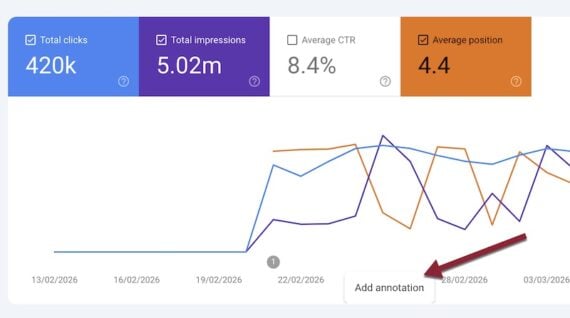
Right-click on a Performance chart to activate annotations.
Compare branded search by region
Global sellers can check brand searches by country. Use the branded query filter and then add any country. Sellers can also compare two countries, such as branded traffic in Canada and the United Kingdom.
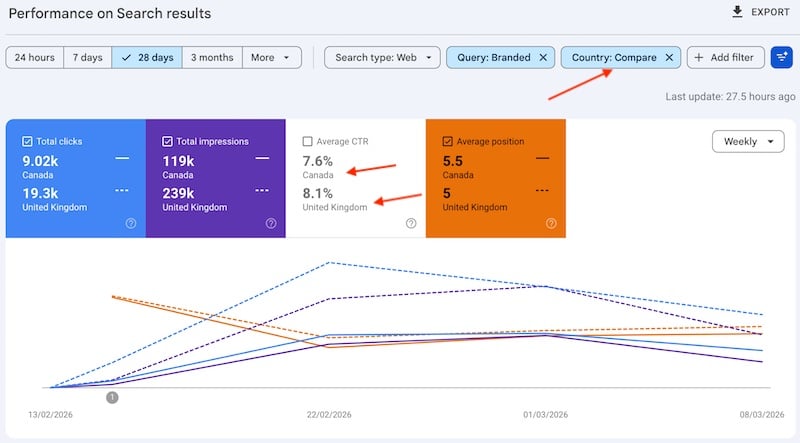
Compare brand recognition in two countries, such as Canada and the U.K.




 Contribution Margin Guides Ecommerce Growth
 Auto-Translate Won't Win E.U. Shoppers
 The Race to Own AI Shopping
 Google's Redirects Blur Search Rankings
 New Ecommerce Tools: August 26, 2026
 New Ecommerce Tools: September 2, 2026