


Time-sensitive promos on Google Ads can be a challenge. Advertisers submit text and assets, but the platform’s algorithm determines what actually shows. Moreover, AI Max for Search creates its own assets.
A date-specific ad message does not automatically show, but the following tactics can increase its chances.
Countdown Customizers
Years ago I explained how scripts can add a countdown to ads. The process is now much easier. The countdown customizer adds the feature directly in ad copy. It dynamically shows the remaining time until the promotion ends, adding a sense of urgency.

Countdown customizers, such as “Ends In 10 Days,” appear directly in ads.
Advertisers enter the countdown ending date and time, when it starts, and the relevant time zone. On the final day, the countdown automatically switches to hours and minutes.
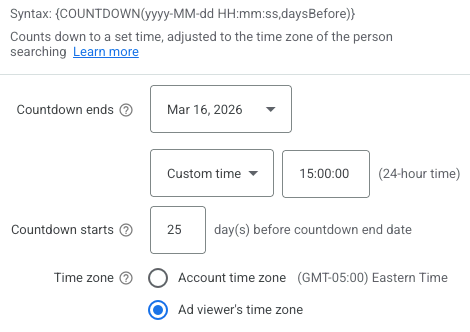
Enter the countdown ending date and time, when it starts, and the relevant time zone.
I typically use pinned headlines to show the offer in headline one and the countdown in headline two.
This one-two punch instructs Google to show the message in that order whenever headlines one and two show concurrently. Plus, it ensures the offer always shows since Google sometimes only shows one pinned headline.
Pinned headlines obstruct Google Ads’ algorithm, which presumably means they show less, though I’ve seen little impact on conversion metrics. A non-pinned ad in an ad group will likely show more, and pausing a non-pinned ad can result in fewer impressions for a pinned version.
Promotion Asset
Google Ads now calls extensions “assets.” A promotion asset is an additional 25-character line that highlights the offer and can include dates. Advertisers submit:
- Promotion type (monetary or percent discount),
- Promo code (if needed),
- Displayed promotion dates (either the start and end dates, or just the end),
- Item(s) on sale,
- URL of the sale page (or site).
The promotion dates are optional, but I prefer them for urgency. Advertisers can schedule the promotions to start and end, eliminating the need to turn them on and off manually.
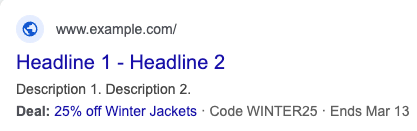
Promotion assets can include end dates, such as “Mar 13” in this example.
Callout Asset
Callouts are non-clickable highlights alongside the ad. They can address benefits, features, and promotions. Callouts cannot exceed 25 characters, requiring succinct messaging, such as:
- “25% off Winter Jackets”
- “Winter Jackets Sale”
- “Winter Jackets – 25% off”
Advertisers can schedule callouts, like promotions. Up to 10 callouts can show, though it’s usually two to four. The more callouts, the fewer chances promo messaging shows. Consider pausing other callouts if running an offer-specific one.
Sitelink Asset
As with promos and callouts, sitelinks are additional text in an ad. Sitelinks are clickable, schedulable, include description lines, and can focus on a promotion. Like callouts, many sitelinks can show at once, which could lessen the impact of time-sensitive offers.
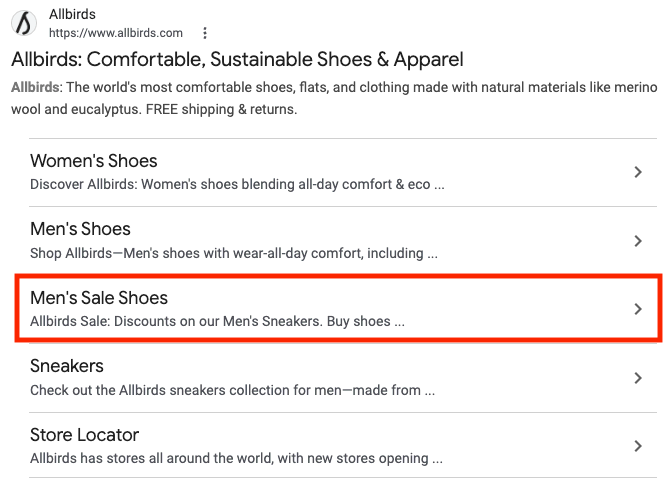
Many sitelinks can appear at once, such as this example from Allbirds.




 Retail Media's Opportunity Cost
 New Ecommerce Tools: October 7, 2026
 New Ecommerce Tools: October 14, 2026
 New Ecommerce Tools: October 21, 2026
 Guardrails for Google Ads AI
 Desktop Habits Hide Mobile Friction