Twitter offers several ways to integrate tweets into a retailer’s website. Showing tweets increases the number of followers. It also keeps the website updated with new content. And it serves increase the community around the retailer’s brand.
With that in mind, here are three of the most popular ways to easily integrate tweets into your website: “Profile Widget,” “Faves Widget” and “Embeddable Tweets.”
Profile Widget
The Profile Widget displays the most recent Twitter updates on any web page. To customize and install the widget, go to the Profile Widget page at Twitter.com, then follow these steps.
The Profile Widget displays your latest tweets. Enlarge This Image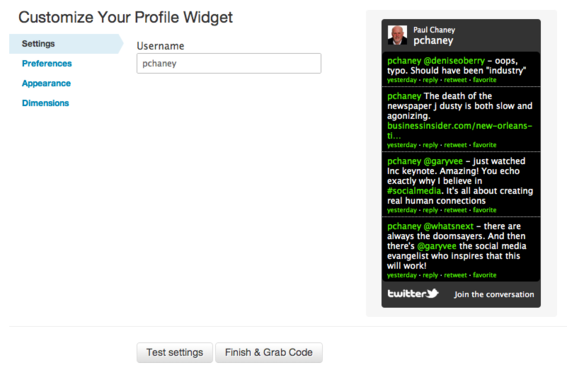
Step 1. Insert the username of the Twitter account in the “Username” field.
Step 2. Click “Preferences” in the left-hand column and decide on the following options.
- Poll for new results. I recommend “Yes.”
- Include scrollbar. If clicked, this option allows users to scroll to see older Tweets.
- Behavior. You can choose either “Timed Interval,” which loads Tweets based on a time frame determined by you — 30 minutes is the default — or “Load All Tweets,” which loads the latest Tweets based on a number you set. Four is the default, but you can choose whatever number you wish.
Step 3. Click “Appearance” in the left-hand column to set the color scheme. Choose one that matches the look of your website.
Step 4. Click “Dimensions” in the left-hand column to determine height and width parameters.
Step 5. Click the “Test Settings” button to preview the widget and make necessary changes.
Step 6. Click the “Finish and Grab Code” button, then copy and paste the HTML code into your website.
Faves Widget
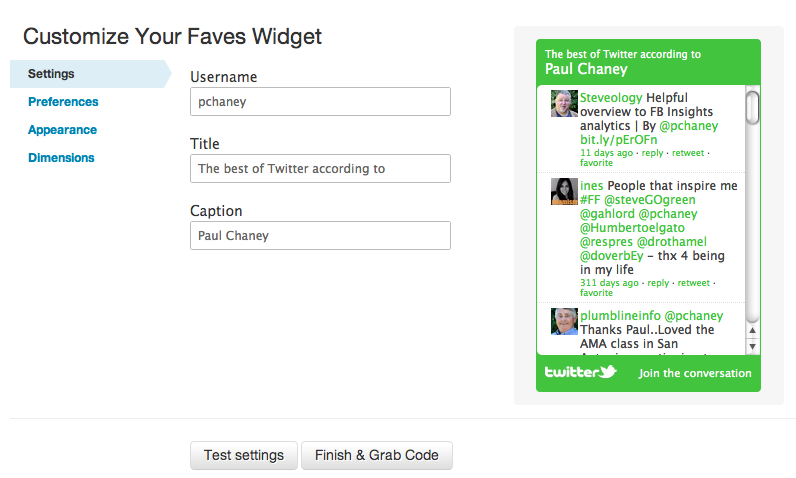
The Faves Widget allows you to show off your favorite tweets, by pulling in tweets you have starred as favorites.
The Faves Widget displays tweets marked as favorites. Enlarge This Image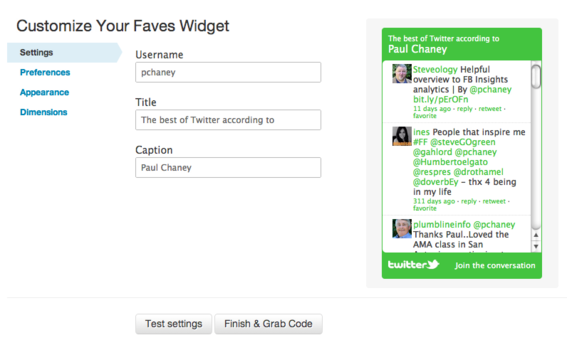
Customization of this widget follows the same steps as that of the Profile Widget, with one difference. Under the “Settings” option, along with Username, there are two additional fields: Title and Caption.
The Title field defaults to the term “The best of Twitter according to.” But it can be changed according to your preference. The Caption field should contain your company’s name.
Embeddable Tweets
Twitter provides a way for site owners to embed specific tweets into their websites. There are three ways this option could be used.
- Within blog posts. When a tweet addresses a topic covered in the post, or when the post is written in response to the tweet itself.
- On product detail pages. For tweets that relate to a specific product.
- On a “testimonials” page. For tweets that express positive sentiment about the brand.
Follow these steps to embed a tweet.
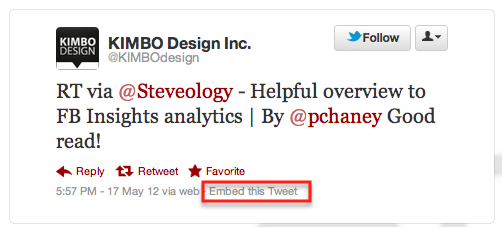
Step 1. Go to your account at Twitter.com and locate the tweet you would like to embed, then click “Expand.”
Choose the tweet you wish to embed. Enlarge This Image
Step 2. Once expanded, click the word “Details.”
Click "Details" to open a page with the specific tweet. Enlarge This Image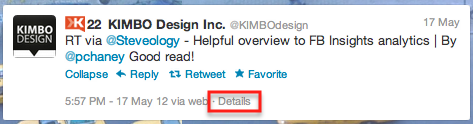
This will open a page containing only that specific tweet.
Click "Embed this Tweet" to get the HTML code. Enlarge This Image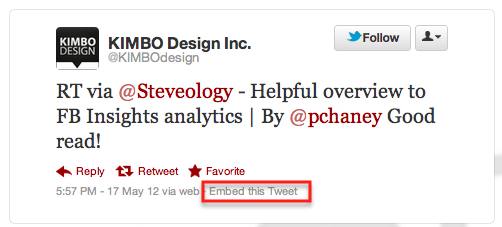
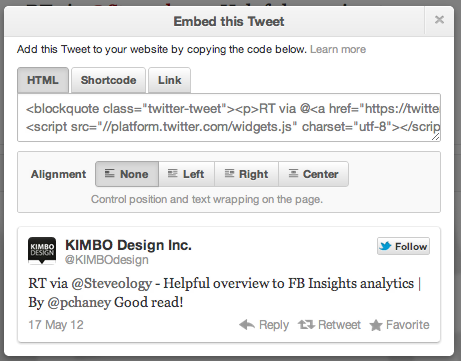
Step 3. Click the word “Embed,” which will open a dialogue box containing the necessary HTML code.
Copy and paste the HTML code into your website. Enlarge This Image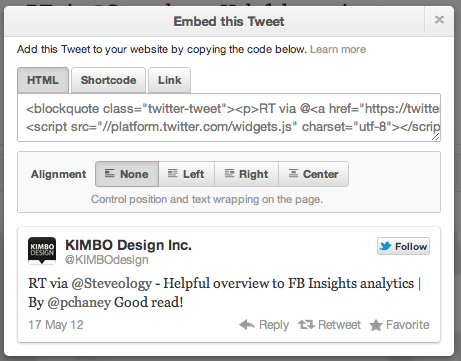
The HTML code presents the tweet in such a way that viewers may “retweet,” “reply,” “favorite,” and “follow” easily from the rendered view.
Other embed options include “Shortcode,” which can be used on platforms that support Twitter shortcodes, such as WordPress sites, and “Link,” which contains the URL of the tweet. There are also alignment options that control the position and text wrapping of the tweet on the page. Experiment with the various options to see which one works best.
Summing Up
Use these three Twitter integration options to increase social media interactivity on your site, augment existing content, grow your follower base, and build community around your brand.
To learn about other ways to incorporate Twitter, check out “Resources” at Twitter.com.





 Retail Media's Opportunity Cost
 New Ecommerce Tools: October 7, 2026
 New Ecommerce Tools: October 21, 2026
 New Ecommerce Tools: October 14, 2026
 Guardrails for Google Ads AI
 Desktop Habits Hide Mobile Friction