


A recent design trend on ecommerce sites is applying the same color as the physical product to every element on the page.
It’s a bad, bad UX.
Human beings want to get from point A to point B as easily as possible. Speed bumps force us to spend brain energy, and that’s draining, even for online purchases.
Imagine you’ve heard about a natural deodorant brand. You’re excited to try it, and get to this screen on your phone:
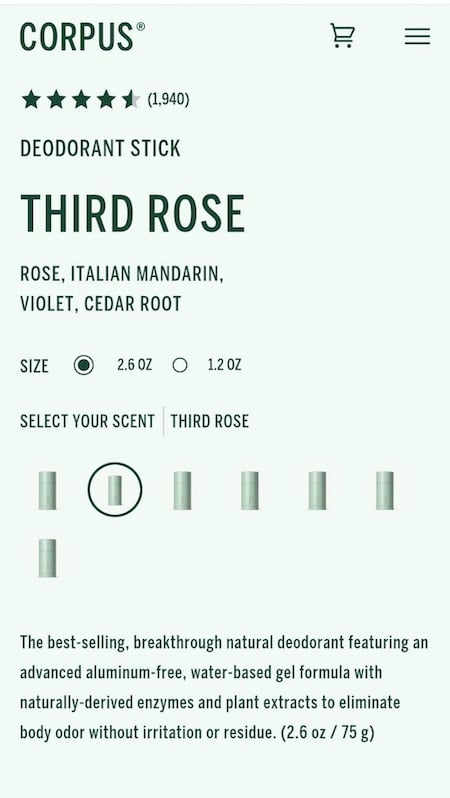
How to tell one scent from the other?
You think, “It’s all green here. And all the scents look the same, with no indication of what they are. Do I have to click each of them? Maybe it’s just my mobile. Let me look on my laptop.”
The wider screen version is actually worse.
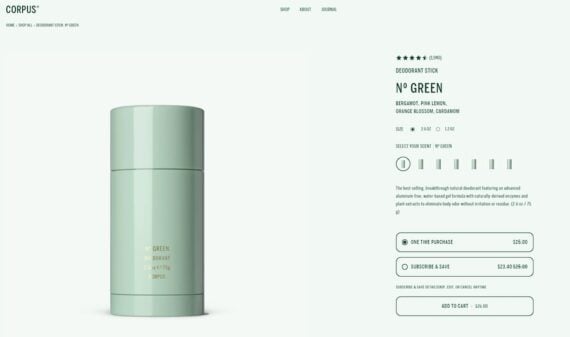
On desktop, only the product name and image stand out.
It’s all green, matching the product package color.
The scent variations are still small and look the same. You indeed have to click them all.
Only the product name and image stand out. There’s no visual indication for links. There’s a subscription discount tag, but the struck-through price looks almost the same as everything else on the page, as does the add-to-cart button.
Amazingly, I’ve found an even greener version of this trend for a tea brand called Blue Bear. This product page wears green top to bottom: the product name, benefit tags and icons, subscription savings tags, and add-to-cart button.
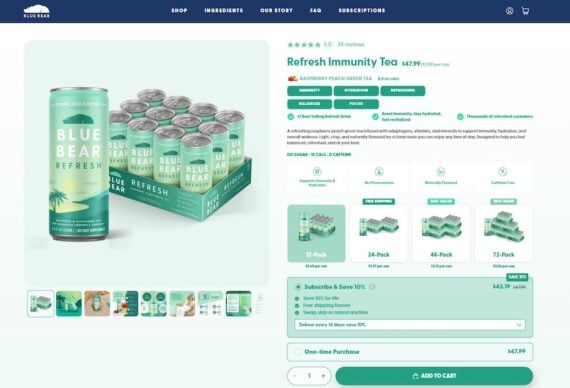
Blue Bear has a green page.
The 12-pack example uses the same fill as the Subscribe & Save box below it.
A student who underlines every sentence in the textbook highlights nothing. Similarly, a single color means nothing stands out. By the time the shopper’s eye reaches the add-to-cart button, nothing signals the call to action.
Visual hierarchy tells the shopper what matters first, what can wait, and what to do next.
Color can convey priority, but only through contrast: we notice the thing that differs from its surroundings. Wrapping the whole page in your brand’s color removes that contrast.
Next Steps
- Go to your product page. Take a screenshot, convert it to grayscale, and blur it slightly. Your eye should land on the add-to-cart button first. If it’s the logo, a badge, or nothing at all, your hierarchy is running on color alone.
- Reserve one color for action. Your product color can own the background and the photography. Pick a single contrasting color for the primary button and the selected state, then check that no other element on the page uses it.
- Separate “tap me” from “read me.” Benefit tags, claims, and badges shouldn’t look like buttons. If a shopper can’t click it, make it plain text with an icon, not a filled pill.
- Make the savings visible. A crossed-out price disappears if it matches the weight and color of its surroundings. Give the discount its own contrast to be readable at a glance.





 New Ecommerce Tools: October 21, 2026
 Retail Media's Opportunity Cost
 New Ecommerce Tools: October 7, 2026
 New Ecommerce Tools: October 14, 2026
 Desktop Habits Hide Mobile Friction
 Beware of AI Content for SEO