


A website’s own search engine is fundamental to helping customers find products, make purchases, and have a positive shopping experience.
Speaking at an ecommerce conference in Brazil, Ed Huffman, vice president of global sales and business development for SLI Systems, a site search provider, told his audience that 43 percent of site visitors use search to navigate and find products. Separately, Mahmood Ahmad of FindWise, a site-search consulting firm, estimated that the number of visitors using site search was really about 50 percent.
If 43 percent or 50 percent or even 25 percent of an online retailer’s audience is using site search to locate products, then it is clear that site search can have a significant impact on sales. Designing an ecommerce site to both encourage search and offer great search results may help merchants sell more. In fact, Huffman also noted that customers using site search might convert at a higher rate than their non-search peers.
So what sort of design choices makes an online retail site more search-centric? Here are four suggestions.
Make Search Fields Large, Readable
Usability guru Jacob Nielsen writing on his web usability blog, Alertbox, once said that “search is the user’s lifeline for mastering complex websites.”
If search were a lifeline, meant to save site surfers from a poor shopping experience, online retailers would be wise not to hide search boxes, but rather make them an important part of each page’s layout.
Amazon, which is, perhaps, the most recognizable online merchant in the world, includes its search box at the top of each page, positioning it to maximize visibility.
Amazon emphasizes search on its site.
In a similar way, Barnes & Noble has a large, clearly defined search box at the top of its page.
Barnes & Noble also has a large search box in its site design.
A third example making search fields large and very readable can be found at Cafe Press, the retailer of custom t-shirts.
Cafe Press is a third example of making search fields prominent.
Suggest Search Terms
SLI’s Hoffman said that about a third of site search users take advantage of search suggestions.
These users are twice as likely to make a purchase, and, also according to Hoffman, likely to purchase more, boosting average order value some 17 percent.
Good search suggestions should appear below the actual search field, right in line with the term being sought. Consider using a plan, readable font and making a clear distinction between what the user is typing and the search suggestions.
Search suggestions should appear just below the search field.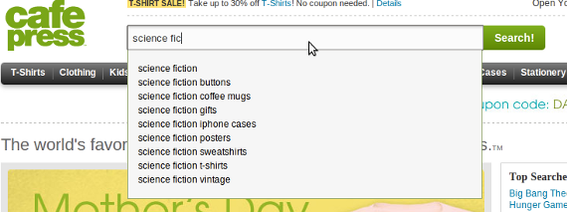
Search suggestions do not have to be limited to trying to match a word. For example, Apple offers both word suggestions and product suggestions in its search field hints.
Apple shows products in its search suggestions.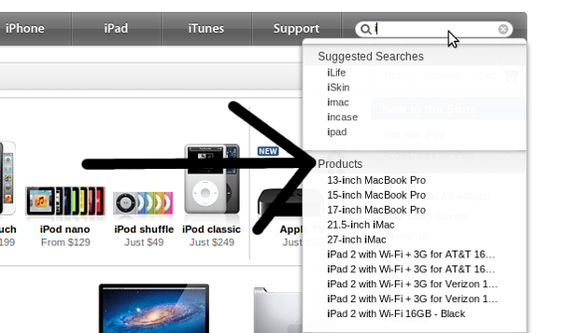
Add Facets to Search Results
No search engine is a mind reader, so it may not be possible to give a user a perfect response to each search query on the first try.
Rather than making the shopper work to compose a better search query, make search results filterable with facets focused on product features or attributes. As an example, a search for a men’s t-shirt might include facets for color or size, helping the user narrow the result set. Likewise, a search for cuckoo clocks may include facets for price or builder.
Just Cuckoos includes facets for price, size, and manufacturer in its search options.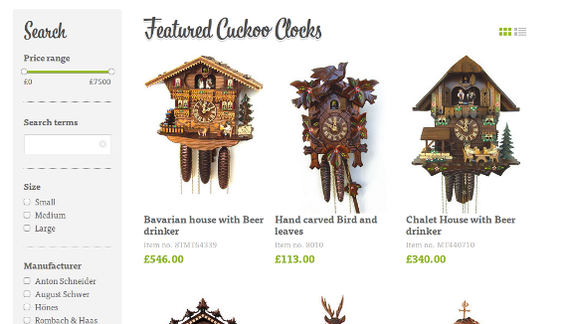
When possible, have facets and filters react quickly, updating the search results as seamlessly as possible.
Jelly Belly uses Ajax to make its facets and filters every responsive.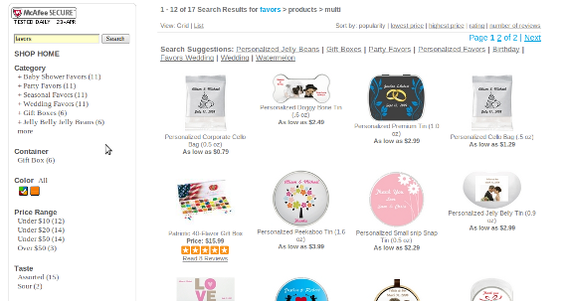
Include Results from Reviews, Social Media
Social media and product reviews are two potent ways to build trust, engage customers, and, hopefully, make more sales. Online merchants should consider including content from these media on search results pages or even in search facets.
For example, FTD allows users to sort search results by Facebook Likes.
FTD include Likes as a search criteria.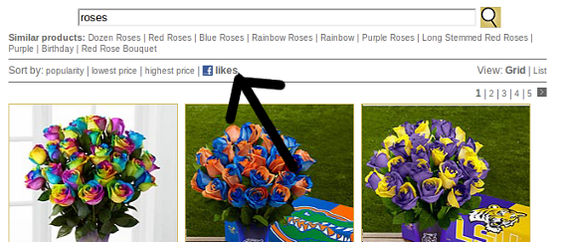
Results directly from YouTube, Facebook, or Pinterest could also be included directly in the results.
Summing Up
Search is a powerful conversion tool for online merchants, and designing a site to facilitate search could lead to more profits.




 AI Shopping Could Mean Fewer Returns
 New Ecommerce Tools: September 23, 2026
 Shopify Opens to Meta Muse; Amazon Balks
 New Ecommerce Tools: September 30, 2026
 Don’t Make Them Count
 New Ecommerce Tools: October 7, 2026