


Google Ads video sequence campaigns show multiple clips in a specific order to individual viewers. Sequence campaigns typically produce strong awareness and reach metrics, though other YouTube types are better known.
Other types likewise use multiple videos, but only sequence campaigns run in a predetermined progression. Google allows six sequence-campaign templates, each with a unique purpose:
- Introduce and reinforce. Expose viewers to a brand through a long video, then reinforce it with a short one.
- Prompt and inspire. Show viewers a short video, then inspire with a long one.
- Attract and direct. Show viewers a short video, reinforce with a long video, then spur action with another short.
- Engage and differentiate. Tell a brand story through four short videos.
- Custom sequence. Advertisers choose the video combination and order.
- Automatic sequence. Advertisers upload videos; Google optimizes the order.
Campaign setup
To build a video ad sequence campaign, begin with “Create a campaign without guidance.” Then select the “Video” campaign type. Selecting the “YouTube reach, views, and engagements” option won’t show the ad sequence option.
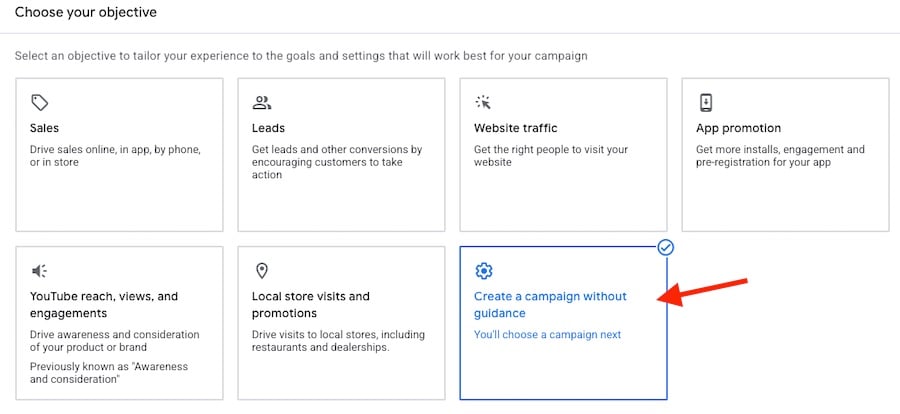
Select “Create a campaign without guidance” to start building a video ad sequence campaign.
Then choose the “Ad sequence” subtype and enter the campaign settings:
- Daily or total budget
- Start and end dates
- Conversion goals
- Geotargeting
- Audience segments
- Device targeting
- Related videos to show below the ad
Video sequence advertisers can use only “target CPM” bidding and must set frequency capping to limit how often one person can see the sequence. The options are once every 7 or 30 days.
Sequence setup
Each sequence step is an ad group. Four sequence steps equate to four ad groups. Each ad group contains:
- The YouTube video
- The ad formats (“skippable,” “bumper,” or “non-skippable”)
- A call-to-action of 10 characters max
- A headline of 15 characters max
- A companion banner on desktop computers (to provide more exposure on larger screens).
Videos two and greater require step transitions in three choices: “impression,” “view,” or “skip.” For example, step two shows if the first video had an impression. Step three shows if the second video had a view. Advertisers can customize step transitions to create their desired narratives.
Google’s Asset Studio can shorten videos as needed via the”Trim videos” option. The tool works with various video formats and durations. Asset Studio can also create AI videos, though I avoid using them successively, if at all.
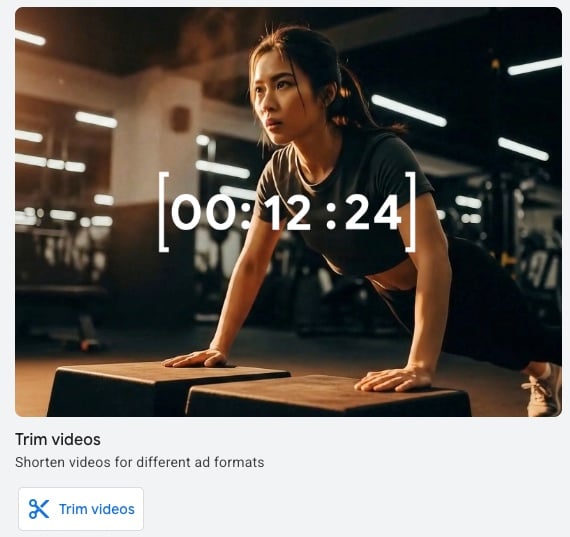
Google Asset Studio’s “Trim videos” option can shorten videos.
Example
Say the marketers at Yarbo, maker of robot lawn mowers, want an “Introduce and reinforce” sequence. The team starts with the company’s demo video and trims it into two parts.
- Introduce: 30-second video showcasing how the product works and its benefits.
- Reinforce: 15-second video showing families enjoying the extra time from no yard work.
The first video’s headline is “Save Time. The CTA is “Learn more,” which links to the home page. Viewers now know the product and go to the main site to explore more.
The second video’s headline is “Labor Day Sale.” The CTA is “Buy now,” which links to the main product page.
The Yarbo team can test headlines and landing pages to reach the most potential customers.
Using this same demo video, the sequence could be four 15-second “Engage and differentiate” clips:
- Step 1: What is Yarbo?
- Step 2: Key features (wide blade width)
- Step 3: Key benefits (more family time)
- Step 4: Customer testimonials
Interpreting results
Video ad sequence campaigns aim to generate demand and engagement. Google provides metrics such as:
- Earned views: The number of ad viewers who then watched another video on the advertiser’s YouTube channel.
- Video played: The percentage of viewers who watched 25%, 50%, 75%, or 100% of a video.
- Unique users: The total number of viewers to the ad.
Advertisers can also track clicks and conversions. But the goal, again, is engagement, which the three metrics above address. For example, a video needs work if only 10% of viewers watch 100% of it.





 AI Shopping Could Mean Fewer Returns
 New Ecommerce Tools: September 30, 2026
 Retail Media's Opportunity Cost
 New Ecommerce Tools: October 7, 2026
 Guardrails for Google Ads AI
 Desktop Habits Hide Mobile Friction